
Session Respect Score
"Arcade shoot 'em up with upgrades and multiplayer mayhem."
Minimum session
10 min
Pausability
No pause
Resume friendliness
Easy to resume
FOMO pressure
Low FOMO
Focus required
Intense
Session structure
Missions & levels
Where to play

Similar games






Platforms
About
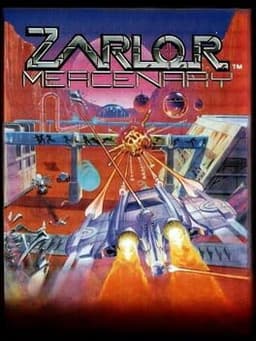
Zarlor Mercenary is a vertically scrolling shoot 'em up in which the player controls a spacecraft destroying enemy spaceships and buildings in order to earn money which can be used to buy upgrades between levels. At the end of each level there is a boss ship or landing craft that needs to be destroyed. Up to four players can play simultaneously using the Comlynx. Noted in the game manual you don't start with life but a fleet of ships. In single-player you start off with four ships, in two player mode you start off with three ships each. With three and four players you only start the game with two ships each. There are seven different pilot mercenaries to choose from, each having their own permanent unique weapon or skill. When playing in multiplayer mode, each player has a unique colour, you can either work together or towards completing the game. However one can purchase the weapon attachment backstabber that can kill another pilot causing him to loose money. The ship health bar is on the right as a horizontal green bar, this will deplete to yellow and flash red when near destruction. Ships left in the fleet are displayed as blue dots, while the mega bomb is displayed as a red dot.
The war had been going on for years between the Mendicant and the Zarlor races. It wasn't going anywhere so the Zarlors decided to hire outside help. There are six key installations on the Mendicant's home planet of Yorith. The first mission is the Cadmar Desert where you are to locate and destroy a super weapon. The s…
Media
Community Tips
Be the first to leave a tip!
Sign in to add a tip
Community Session Data
No sessions logged yet —
Context Tags
No sound needed? One-handed? Good for commutes? Players vote.
Sign in to vote on tags
Platform Notes
Does it actually work well on your platform? Community tested.
Zarlor Mercenary — Session FAQ
- How long does a session of Zarlor Mercenary take?
- The minimum meaningful session for Zarlor Mercenary is approximately 10 minutes. This is the shortest play window where you can make real progress or have a satisfying experience, based on community data.
- Can you pause Zarlor Mercenary?
- Zarlor Mercenary cannot be paused mid-session (it runs in real-time or is multiplayer). Plan for a full session window before starting.
- Does Zarlor Mercenary pressure you to keep playing?
- Zarlor Mercenary has low FOMO. There may be some narrative momentum, but the game doesn't pressure you to keep playing. Natural stopping points are common.
- What is Zarlor Mercenary's Session Respect Score?
- Zarlor Mercenary has a Session Respect Score of 6.5/10. This score combines minimum session length, pausability, FOMO level, and pickup friendliness into a single metric for how well the game fits busy schedules.